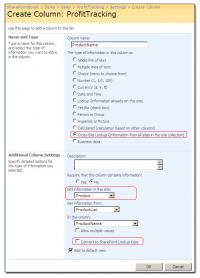
1)lookup information of columns on different sites in one site collection 2) Convert to SharePoint default Lookup column 3) Shortcut to the value you want with a keystroke
What Does It Do?
Out-of-box SharePoint list settings support intra-site lookup field but cannot meet end users' demands when it comes to looking up some information on other sites in the same site collection. SharePoint Cross-Site Lookup provides additional features beyond the default Lookup function and most SharePoint Cross-Site Lookup solutions. These features include:
Allow users to refer to a list from a different site in one site collection.
Support conversion from Cross-Site Lookup column to default Lookup type; therefore, altering the content of Cross-Site Lookup column in datasheet view can be achieved.
Find-as-you-type function makes all the objects which are listed in the Dropdown list with the same letter as the input word shadowed and selected quickly.
Support FILTER function for Cross-Site Lookup column by selecting some list view of the look-upped list.
What make it different?
In addition to Cross-Site lookup function, the basic function as same as other Cross-Site Lookup solutions, SharePointBoost Cross-Site Lookup provides three useful features.
1. SharePointBoost Cross-Site Lookup users can convert Cross-Site lookup column into default SharePoint lookup type when they need to edit contents of Cross-Site Lookup column in datasheet view.
2. When SharePoint users select objects, they do not have to scroll down through all the other objects. The find-as-you-type function makes SharePoint users easily select objects by one keystroke; all the words with the typed letter is shadowed and filtered in the dropdown list
3. If the look-upped list is incredibly larger than usual, it is difficult for SharePoint users to choose one object from countless objects and the drop down list will be too long. Filter function helps a lot by supporting SharePoint users choosing some list view of the look-upped list to quickly find out the object.
Requirements:
• Windows SharePoint
• .NET Framework 3.5
• Microsoft Internet Explorer 7 or greater
Operating system:Windows 2003 / 2008 / 2008 x64 / 2008 R2 / Server 2012
Release notes:Major Update

Freeware MMS Server, SMS Server. Send MMS SMS from PC using GSM modem or mobile phone. Receive MMS file content and save to PC. Send applet, video and MP3. Send Wap Push Interface with your own programming tools using VB,VS,Delphi, PHP,ASP.
Price: $, Rating: 8.73, Downloads: 3532
Download

Robust and secure content/reverse proxy server solution for Windows. A filtering and caching content proxy and securing and accelerating reverse proxy with URL rewrite, GZip and SSL as well as load-balancing with smart failover.
Price: $59, Rating: 9, Downloads: 116
Download
Microsoft has annoyed the world with RDP 6 issues, bugs, difficulty to install it, requierements... RDP 6 portable is the very simple, easy to use program to blow-up all of these issues. It is a fully functionnal RDP 6 client standalone program.
Price: $0.00, Rating: 8, Downloads: 108
Download
All outgoing e-mails of a company can be provided automatically with content like messages, product notes or current enterprise news.
Price: $, Rating: 5, Downloads: 103
Download
Easy to use, TSplus is reliable, scalable, unexpensive and runs on XP, Vista or Small Business Server. TSplus includes features such as remote application access, seamless windows, load balancing, remote file transfer, Universal Printer.
Price: $125, Rating: 9, Downloads: 95
Download 
 SharePoint Cross-Site Lookup 4.2.509.2